User manual/Engineering
Variables and connections
Types, structures, S7, Beckhoff ADS, Modbus TCP and OPC UA connections and binding each field without writing JSON.
3 min read
Concepts
- A variable is project data: name, type, initial value and write permission.
- A connection identifies a device: protocol, IP, port and poll cycle.
- A binding says where the data lives inside that device (DB and byte, or Modbus register).
Screens only know variable names. Swapping PLCs never requires touching screens.
Types and structures
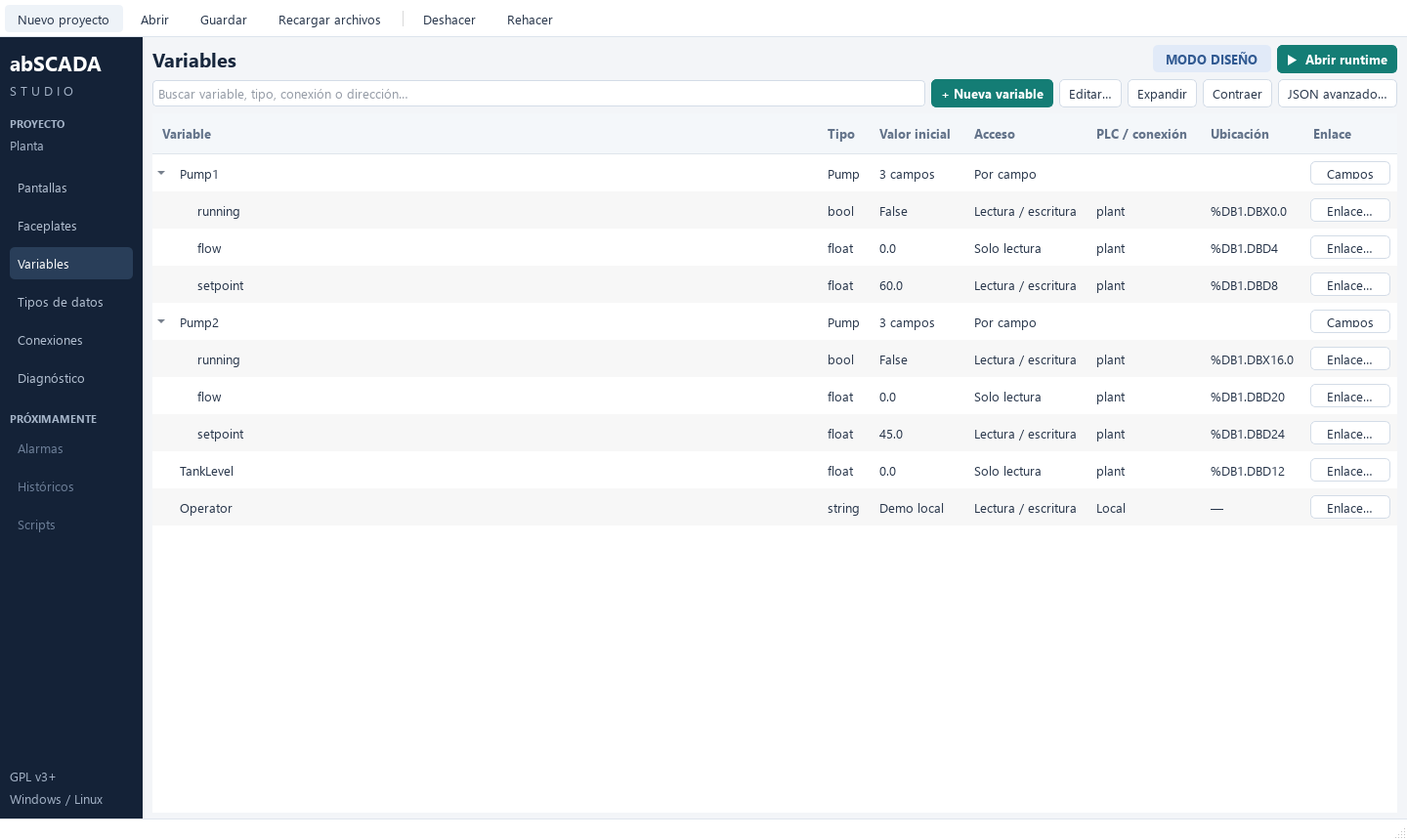
Primitive types: bool, int, float, string. In the Data types tab of Variables you can define structures, e.g. Pump with running, flow and setpoint. A structured variable appears as a collapsible group: Pump1.running, Pump1.flow… Each field can have its own binding and permission.
Creating a connection
In Connections click Add and pick a protocol.
| Protocol | Connection data |
|---|---|
| OPC UA | Endpoint, security policy, username, password and polling interval |
| Siemens S7 | IP, port (102), rack, slot, cycle in ms |
| Modbus TCP | Host, port (502), Unit ID, timeout, cycle in ms |
| Beckhoff ADS | IP, TCP port (48898), PLC AMS Net ID, ADS port (851 or 801, depending on the PLC), local AMS Net ID, timeout |
The cycle accepts 50 to 60000 ms. It is a target, not a real-time guarantee.
Binding a field
In Variables expand the structure and click Binding… on the field. The form adapts to the protocol of the selected connection.
Siemens S7: DB, byte, encoding (BOOL, BYTE, INT, DINT, REAL) and bit for BOOL.
| Variable | Address | Meaning |
|---|---|---|
| Motor.running | %DB1.DBX0.0 |
Bit 0 of byte 0 in DB1 |
| Motor.speed | %DB1.DBW2 |
16-bit integer at byte 2 |
| Tank.level | %DB2.DBD4 |
32-bit REAL at byte 4 |
Absolute access
The S7 adapter reads DB blocks by absolute address. SCADA names are not PLC program symbols. Disable optimised block access on the DB in the PLC configuration.
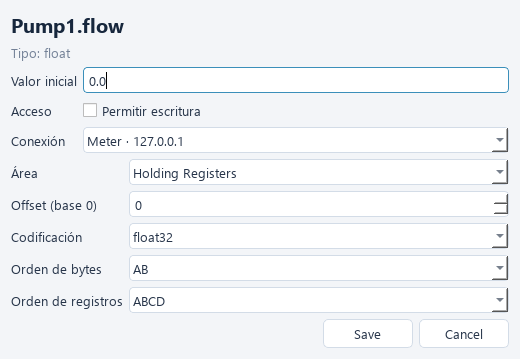
Modbus TCP: area (coils, discrete inputs, holding or input registers), zero-based offset, encoding (uint16 … float64) and byte/word order. Holding register 40001 in a manual is offset 0.
Beckhoff ADS: type the symbol exactly as in the PLC program (MAIN.rVelocidad, GVL.aMotores[2].bMarcha) and its PLC type (BOOL … LREAL, STRING). group:offset also works, e.g. 0x4020:0 for %MB0. The PLC must hold a static route to the SCADA's AMS Net ID. The step-by-step guide is in examples/beckhoff/README.md.
Try it without a Beckhoff PLC
python -m abscada.ads_simulator starts a simulated ADS PLC on 127.0.0.1:48898 for the examples/beckhoff project.
Data quality
| Quality | Meaning |
|---|---|
| good | Successful read or valid internal variable |
| uncertain | No first reading yet |
| bad | Communication failure; last value is kept |
A bad value is never presented as a valid reading: lamps turn amber and texts show —.
OPC UA
Bindings use a NodeId, for example nsu=urn:latolva:plc;s=FV1.Temperatura. The client resolves the namespace on connection and polls values. Enter passwords through Contraseña…; they are stored in secrets.json (base64, not encryption). Unknown certificates require review and acceptance; see OPC UA.