User manual/Examples
Brewery example
La Tolva brewery with an OPC UA PLC, recipes, fermentation, roles and a runtime server for MES clients.
6 min read
La Tolva, in examples/brewery, is a simulated brewery with a brewhouse, three fermenters, utilities, recipes, trends and alarms. Explore the interactive gallery and recipes.
Plant and timing
Hot liquor feeds the mash tun, followed by the lauter tun, kettle/whirlpool, cooler and FV1–FV3 fermenters. Utilities include steam, hot water, chilled water and glycol. Recipe time is compressed: one recipe minute takes one second; one fermentation day takes one minute. A brew takes roughly four minutes and fermentation around 15–20 minutes.
Start
- Open
abscada.exeand pick Microcervecería por lotes · La Tolva on the start screen. - Keep Arrancar también su PLC simulado (also start its simulated PLC) ticked: the program starts the brewery's simulated PLC for you.
- When Studio opens, click Abrir runtime (open runtime).
If you close the simulator, start it again from Herramientas → Simuladores de PLC… (Tools → PLC simulators).
Trust the PLC
The simulator offers encrypted endpoints only. The first connection fails and COM turns red until you trust its certificate:
- Open Proyecto → Certificados OPC UA… in Studio.
- Compare the rejected certificate fingerprint with the one printed by the simulator.
- Choose Confiar en el seleccionado. Runtime retries automatically.
The simulator creates a persistent certificate under %LOCALAPPDATA%\abSCADA\simuladores\cerveceria. Trust persists unless that certificate is removed. The demonstration simulator accepts any client certificate, as a PLC might during commissioning.
Demonstration accounts
Without a session the project is read-only. users.json stores scrypt password hashes for these accounts:
| Username | Password | Role |
|---|---|---|
admin |
Tolva-Admin-2026 |
Administrator |
maestro |
Tolva-Maestro-2026 |
Brewmaster; edits recipes |
operador |
Tolva-Operador-2026 |
Brewhouse operator |
mes |
Tolva-MES-cliente |
Read-only OPC UA client |
These passwords are public demonstration credentials. Replace them or remove these accounts before adapting the project for real use.
Permissions
| Role | Operate | Acknowledge | Recipes | Manage users | OPC UA |
|---|---|---|---|---|---|
| Observer | |||||
| Brewhouse operator | ✔ | ✔ | |||
| Brewmaster | ✔ | ✔ | ✔ | ||
| Administrator | ✔ | ✔ | ✔ | ✔ | ✔ |
| MES client | ✔ |
Recipe editor inputs and SAVE/DISCARD buttons declare "permission": "recipes". Anyone can inspect recipes; the operator chooses which one to brew. Auditing records the user and command origin.
Screens
| Screen | Contents |
|---|---|
| Overview | Brewhouse, current batch, fermenters, utilities and active alarms |
| Brewhouse | Animated vessels and lines, 12-step sequence, recipe and destination, START/HOLD/RESUME/ABORT and mash trend |
| Cellar | Fermenter cards, glycol valves, modes and fermentation curves |
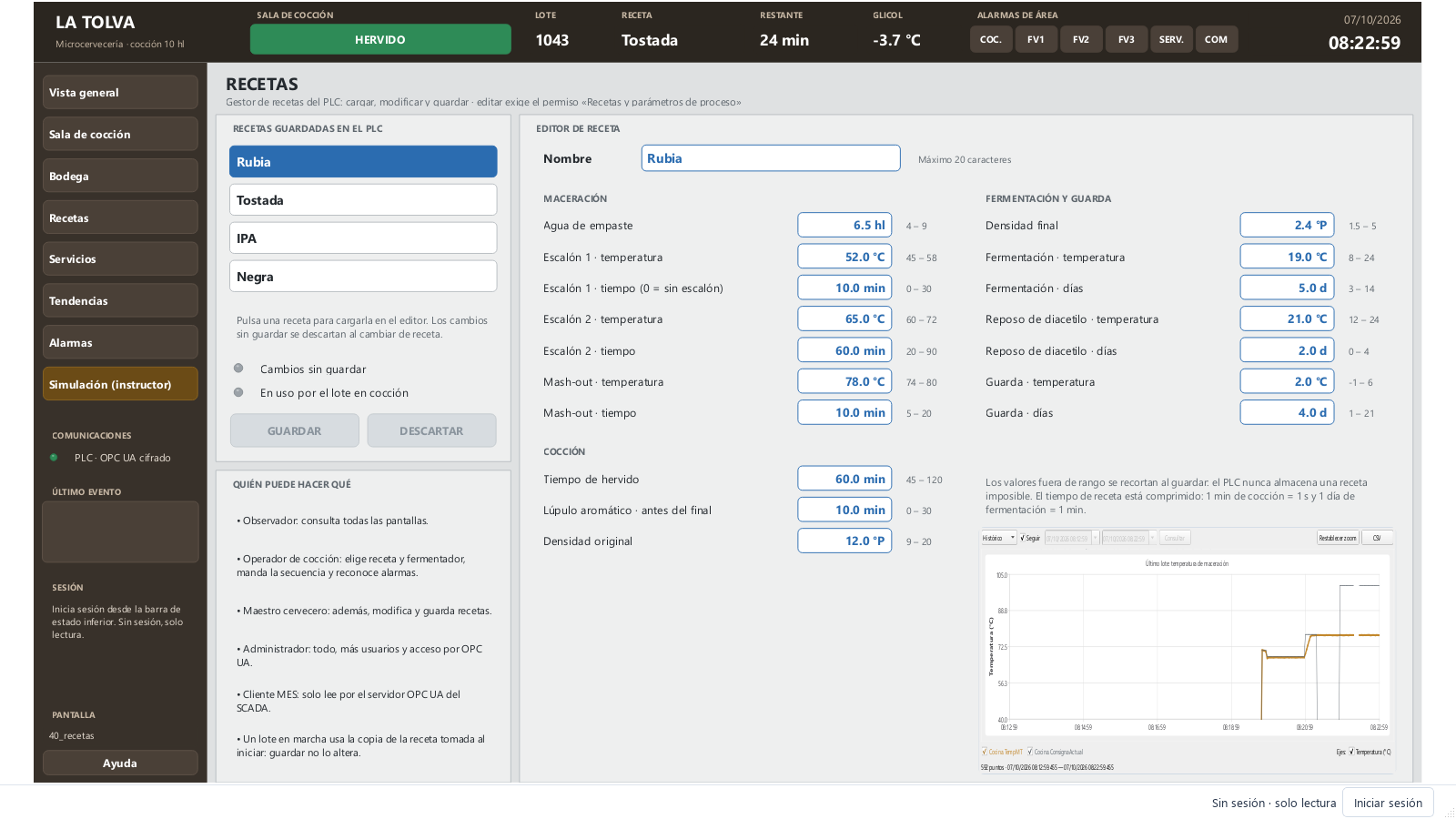
| Recipes | PLC recipe buffer, edit/save/discard and parameter ranges |
| Utilities | Hot water, steam, glycol and chilled water |
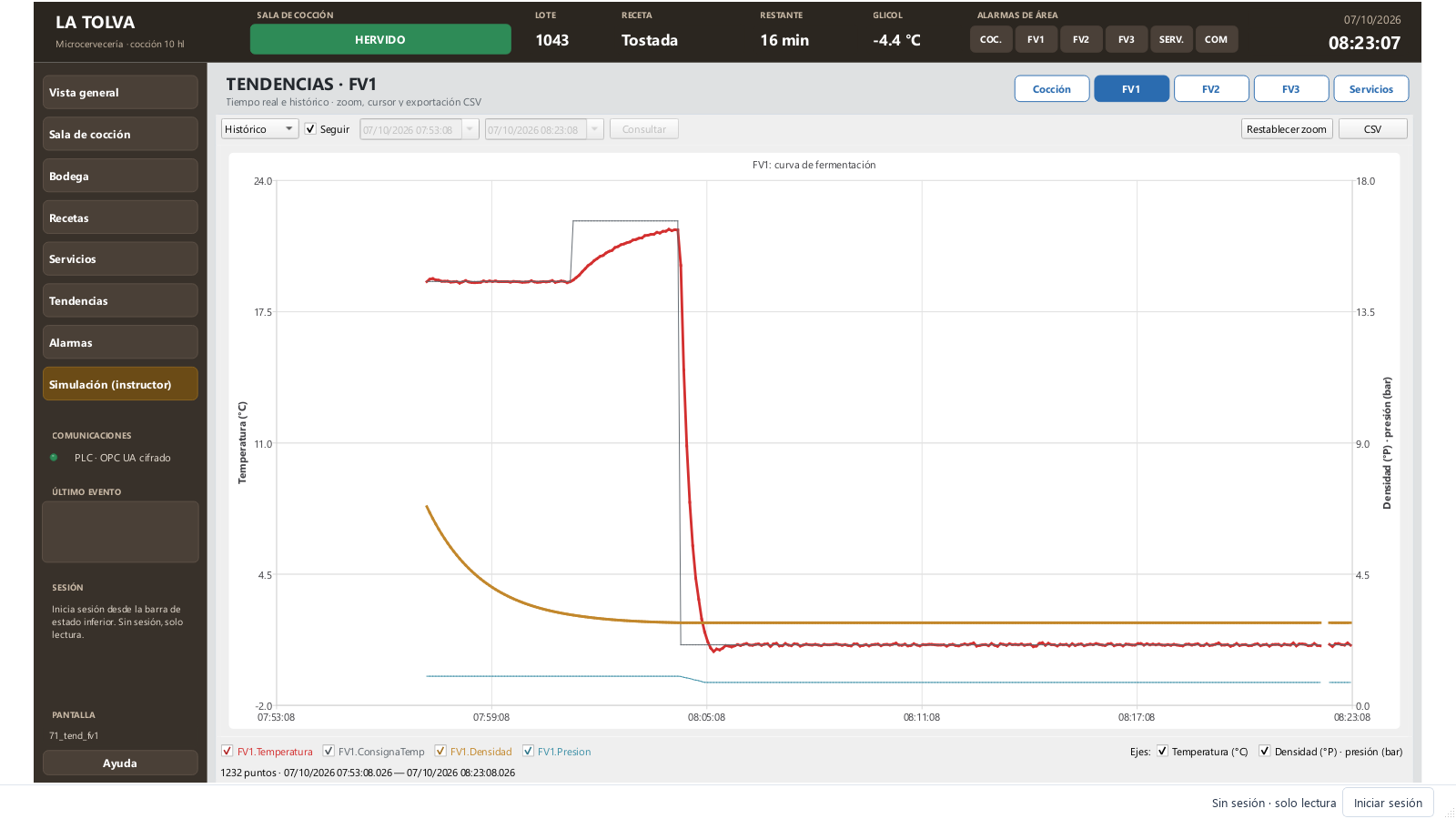
| Trends | Brewhouse, FV1, FV2, FV3 and utilities |
| Alarms | Active alarms, history and events |
| Simulation | Instructor fault injection panel |
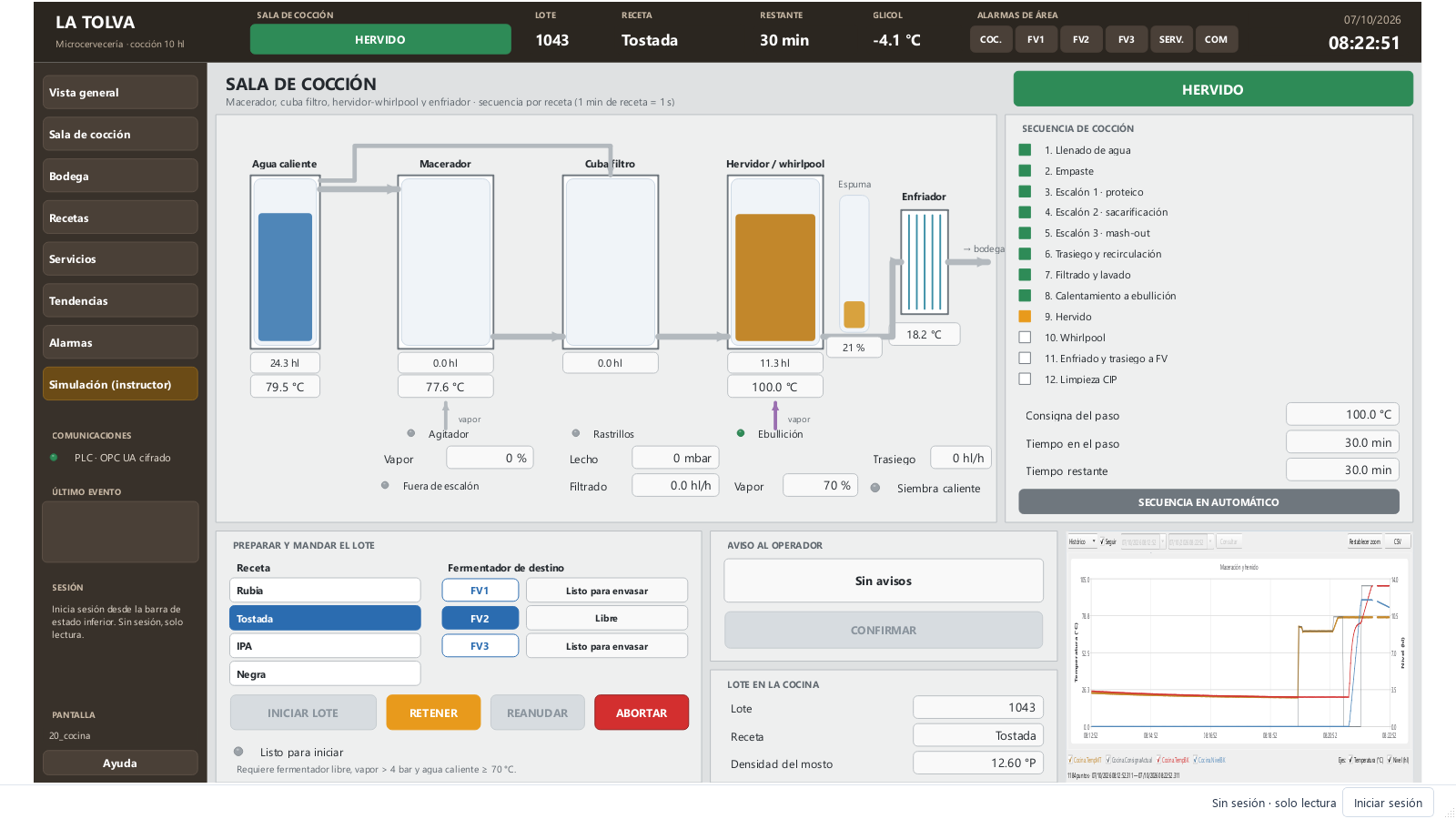
Colours convey state: green running, grey stopped, amber held or awaiting an operator, red alarm, blue editable commands/setpoints. Flowing lines use blue water, amber wort, gold beer and violet steam.
Operate a batch
Choose a recipe and a free fermenter, then press INICIAR LOTE. Starting requires steam above 4 bar and hot water at least 70 °C. The PLC copies the recipe at start; later edits do not alter the running batch.
| Step | PLC action |
|---|---|
| 1 | Fill mash tun with mixed hot water at mash-in temperature |
| 2 | Wait for the operator to add malt and confirm |
| 3–5 | Heat and hold mash rests; skip the first if its duration is zero |
| 6 | Transfer to lauter tun and recirculate for 5 recipe minutes |
| 7 | Lauter and sparge; operate rakes if the grain bed clogs |
| 8 | Heat kettle to boiling |
| 9 | Count time while boiling; request bittering and aroma hops |
| 10 | Whirlpool rest for 15 recipe minutes |
| 11 | Cool and transfer to the fermenter at pitching temperature |
| 12 | CIP for 10 recipe minutes, then idle |
RETENER freezes heating, transfers and sequence timers; REANUDAR continues. ABORTAR asks for confirmation and drains brewhouse wort, including the destination fermenter if filling was underway.
Each fermenter follows fermentation, diacetyl rest, cold crash, conditioning and ready-to-package phases. During diacetyl rest glycol closes and temperature rises freely. Mando… allows a manual temperature setpoint or, when ready, TRASEGAR A ENVASADO to empty the fermenter. Initially FV1 holds a fermenting IPA, FV2 a conditioning Rubia, and FV3 is free.
Recipes
| Recipe | Mash rests | Boil | OG → FG | Fermentation | Diacetyl | Conditioning |
|---|---|---|---|---|---|---|
| Rubia | 52 °C 10 min · 65 °C 60 min · 78 °C 10 min | 60 min | 12.0 → 2.4 °P | 19 °C 5 d | 21 °C 2 d | 2 °C 4 d |
| Tostada | 68 °C 60 min · 78 °C 10 min | 60 min | 13.5 → 3.2 °P | 18 °C 6 d | 20 °C 2 d | 2 °C 7 d |
| IPA | 65 °C 75 min · 77 °C 10 min | 75 min | 15.5 → 2.8 °P | 19 °C 6 d | 22 °C 3 d | 1 °C 5 d |
| Negra | 67 °C 60 min · 78 °C 10 min | 60 min | 12.5 → 3.5 °P | 18 °C 5 d | 20 °C 1 d | 3 °C 5 d |
Selecting a recipe loads an editable PLC buffer. GUARDAR copies it into stored recipe data, clipping out-of-range values; DESCARTAR discards edits.
OPC UA for MES
The project enables abSCADA's server at opc.tcp://<computer>:4850/abscada, with signing/encryption and no anonymous access. Variables appear under Objects/abSCADA. Connect using mes, trust the client certificate in Studio and trust the SCADA certificate in your client. The mes role can read only; writing additionally requires operate.
Exercises
- Log in as
operador, select Tostada and FV3, and start a batch. - Confirm malt and hop additions when prompted.
- During boiling, enable Espuma en el hervor, acknowledge the alarm and observe steam drop from 70 to 40%.
- Enable Fallo de la enfriadora de glicol and observe glycol temperature, fermenter deviation and alarms.
- Try editing recipes as
operador, then sign in asmaestrowith recipe permission. - Enable Levadura inactiva on a fermenting vessel; after one simulated day, fermentation-stalled alarms appear.
- Transfer a ready fermenter to packaging through Mando….
Communications
src/abscada/simulators/brewery_map.py defines the shared generator/simulator map. Connection PLC_Cerveceria polls every 1000 ms at opc.tcp://127.0.0.1:4841/latolva using Basic256Sha256 signing and encryption. Objects are Cocina, FV1–FV3, Servicios and Recetas.
Nodes use nsu=urn:latolva:plc;s=<object>.<field>, such as FV1.Temperatura; namespace URI resolution tolerates reordered namespace indexes. PLC types include Float, Int32, Boolean and String. Commands named Orden… are pulses that the PLC resets after reading. For real equipment adapt endpoints and NodeIds; screens can keep the same variables.
Limitations and tools
The compressed process model is educational, using simplified fermentation and thermal balances. abSCADA is not a safety function: steam interlocks and equipment protections belong in the PLC and field hardware.