User manual/Security
OPC UA
Connect to a PLC and publish runtime variables using project certificates and accounts.
3 min read
abSCADA includes an OPC UA client for PLC reads and writes and an OPC UA server for exposing its variables to other applications. Both are included in the Windows executable.
Connect to a PLC
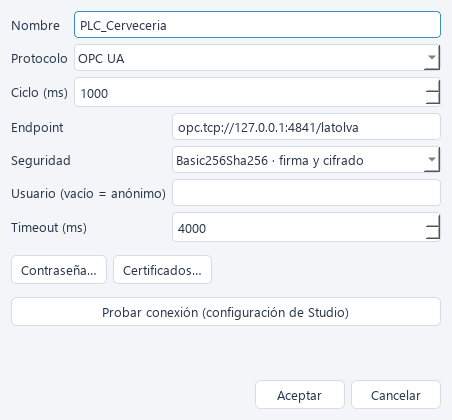
- In Conexiones → + Nueva conexión, select OPC UA.
- Enter the device endpoint, for example
opc.tcp://127.0.0.1:4841/latolva, and the polling interval. - Keep Basic256Sha256, signing and encryption unless the device requires another supported policy. Use no security only for tests.
- If credentials are required, enter the username and use Contraseña… to save the password.
- Enter each variable's NodeId in its binding, for example
nsu=urn:latolva:plc;s=FV1.Temperatura.
The nsu=<URI>;s=<identifier> form resolves the namespace index at connection time. ns=2;s=<identifier> also works, but its index may change when the server is reconfigured. Obtain NodeIds from the device documentation or an external OPC UA browser: Studio does not yet browse nodes.
The client polls; subscriptions and batch reads are still pending. Writes use the node's PLC data type. On Siemens CPUs, OPC UA can access data exposed by the CPU server, including optimised DBs; check your CPU's capabilities and licences.
Trust certificates
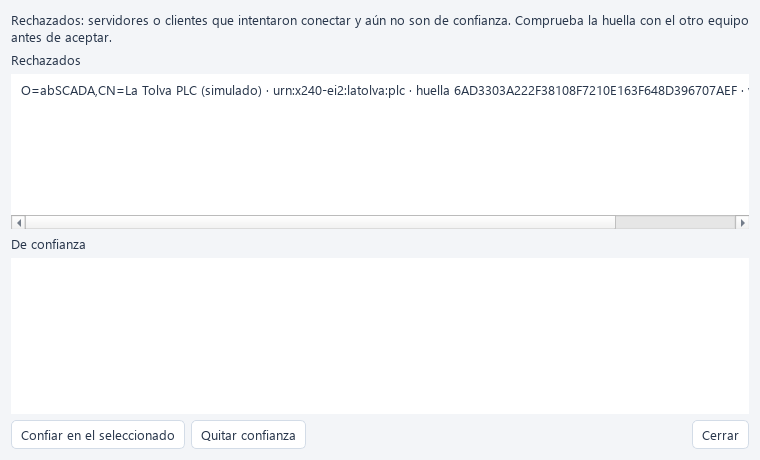
The first connection to an unknown server fails and stores its certificate under Rechazados (rejected).
- Open Proyecto → Certificados OPC UA….
- Compare its fingerprint with one obtained directly from the device or its administrator.
- Trust the selected certificate. If the PLC validates clients, also accept abSCADA's certificate on the PLC.
- Runtime retries the connection automatically.
Own certificates and keys live in pki/own/, accepted peers in pki/trusted/, and pending peers in pki/rejected/. The identity is urn:abscada:<project-folder>:client or :server. Subsequent starts reuse the certificate. Renaming the project folder changes the URI and generates a certificate that peers must accept again. Copying the project with the same folder name and PKI preserves its identity.
For older projects, runtime/pki/ moves to pki/ if the latter does not exist. A certificate containing the old PC-based URI is replaced with one using the project identity.
Publish runtime as a server
In Proyecto → Servidor OPC UA…, enable the server and choose its port and policies. The default port is 4840; the brewery uses 4850, separate from its simulated PLC.
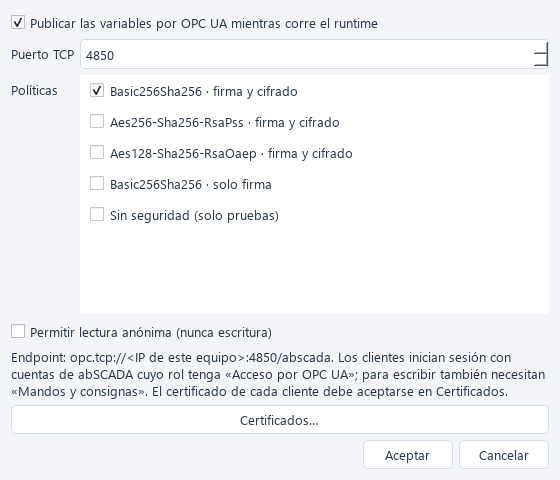
Connect another client to opc.tcp://<computer>:<port>/abscada. Variables appear under Objects/abSCADA, grouped by structure. The data namespace is urn:abscada:<project-name> and each node identifier is the full variable name. This namespace differs from the certificate's application URI.
- Enable security and create an account with the
opcuapermission in Users and roles. - Trust the client certificate in abSCADA and abSCADA's certificate in the client.
- Writes additionally require
operateand a writable variable. Commands pass through runtime validation and auditing; the published value changes when the result is observed. - Anonymous access must be explicitly enabled and is always read-only. With security disabled, accounts cannot authenticate.
- Accounts requiring a password change must complete it in Runtime before connecting through OPC UA.
Files and troubleshooting
opcua_server.json stores server settings. Connection usernames live in connections.json; their passwords live separately in secrets.json, base64-encoded, not encrypted. Protect the project folder, its backups and the private keys in pki/own/.
For failures, check endpoint, port, NodeId, compatible policies, trust at both ends and account permissions. Communication failures retain the last value with bad quality. A configurable server session limit is still pending.
Try the brewery example to exercise both ends without physical hardware.